Multimeter Symbols Explained: A Complete Guide
Staring at a dial covered in tiny symbols and not sure which one to pick? You're not alone, and getting multimeter symbols explained clearly is the fastest way to stop guessing. Each mark stands for one job, from voltage to resistance to continuity.
Pick the wrong one and you get a bad reading, or a blown fuse.
Most of these glyphs follow conventions set by the International Electrotechnical Commission (IEC), so a horseshoe means ohms on any brand. As of 2026, that same core symbol set shows up on nearly every handheld multimeter sold. Once you learn the shapes, any dial makes sense.
Let's start with why they trip people up.

Quick Answer
Multimeter symbols tell you what each dial setting measures. A straight or dashed line means DC, and a wavy line means AC. The horseshoe (Ω) is resistance.
A sound-wave icon is continuity. An arrow with a bar is the diode test. Match the symbol to what you're testing before you touch a probe.
Why Multimeter Symbols Trip People Up (and Why the Dial Matters)
The dial packs a dozen functions into a small space. That's the real problem. Symbols sit close together, and some share the same position.
Manufacturers also draw them differently. One meter prints "V" with a solid line and three dots underneath. Another uses a dashed line.
Both mean DC voltage, but they don't look identical.
Then there's the AC versus DC mix-up. It's the single most common mistake we see in aggregate user reviews. Set your meter to AC when testing a car battery, and the reading bounces around or reads wrong.
For the exact dial position on a 12V battery, our guide on dialing in a car battery reading walks through it.
Here's why the dial matters so much:
- The symbol picks the measurement type (volts, ohms, amps).
- The number next to it often sets the range on manual meters.
- The wrong pick can send too much current through the wrong input.
Learn the shapes once, and the guesswork disappears.
The 30-Second Symbol Cheat Sheet
Want the fast version? Here's every common symbol in one table. Keep it handy the next time you're at the dial.
| Symbol | Name | What It Measures |
|---|---|---|
| V⎓ (straight/dashed line) | DC Voltage | Batteries, car systems, electronics |
| V∿ (wavy line) | AC Voltage | Wall outlets, mains power |
| mV | Millivolts | Small DC/AC voltages |
| Ω (horseshoe) | Resistance | Resistors, coils, wire continuity |
| •))) (sound waves) | Continuity | Broken wires, blown fuses |
| ▶ | (arrow + bar) | Diode Test |
| ⊣⊢ | Capacitance | Capacitors (µF, nF) |
| Hz | Frequency | Signal frequency |
| A⎓ / A∿ | DC / AC Current | Amps in a circuit |
| °C / °F | Temperature | Thermocouple readings |
| hFE | Transistor Gain | Transistor testing |
If a symbol on your meter isn't here, check the manual. Budget brands sometimes add their own icons for backlight or auto-hold.
How to Read Your Multimeter Dial at a Glance
Read the dial in a clockwise sweep, and it starts to make sense. Most meters group similar functions together. Voltage sits in one zone, resistance and continuity in another, current near the high-amp jack.
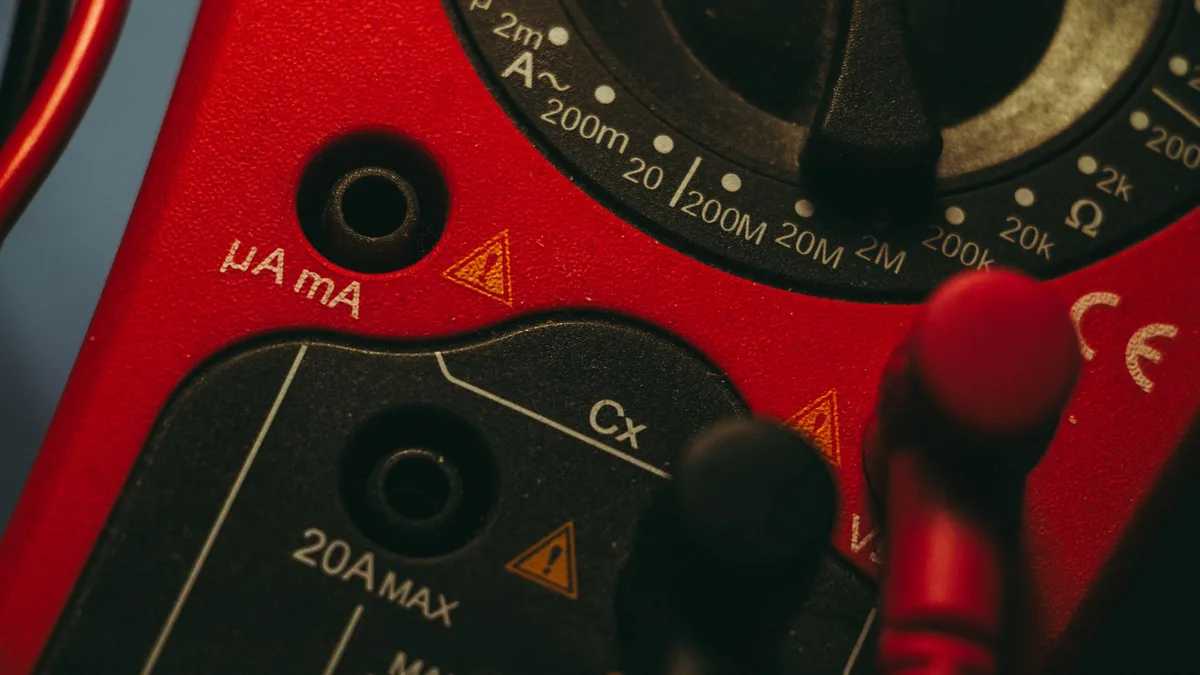
Here's a quick way to decode any dial:
- Find the wavy line versus the straight line. That splits AC from DC.
- Spot the horseshoe (Ω). Resistance, continuity, and diode usually cluster around it.
- Locate the "A" positions. Those are current, and they pair with the high-amp jack.
- Check for a printed range number. If you see 200, 2k, or 20k, you've got a manual-ranging meter.
Auto-ranging meters skip the range numbers. You pick the function and the meter sets the scale. If yours shows range values and you're testing a battery, here's how to lock it to the 20V DC range properly.
One tip from our research: photograph your dial once and label it. New users who do this stop second-guessing within a day.
Voltage Symbols: DC (V⎓) vs AC (V∿)
The voltage symbols are the two you'll use most. Get these right and you've solved half the confusion. Both use the letter V.
The line beside it tells you everything.
The Straight Line vs the Wavy Line
A straight or dashed line means DC (direct current). A wavy line means AC (alternating current). That's the whole rule.
- V with a solid line and dashes (⎓) is DC voltage. Use it for batteries, car electrics, and most electronics.
- V with a wavy line (∿) is AC voltage. Use it for wall outlets and household mains.
Cars run on DC, so a battery check always uses the straight-line setting. If your reading drops hard the moment you crank, that's often a real fault, not a symbol mistake. We break down what causes that voltage dip separately.
And if you're unsure whether a resting number is healthy, our take on what 12.4 volts actually means clears it up.
You can read more about symbol standardization from the IEC's official site, the body behind the graphical marks used on meters worldwide.
Where mV Fits In
The mV symbol means millivolts, or thousandths of a volt. You'll reach for it when measuring very small voltages.
Think sensor outputs, thermocouples, or fine electronics work. Some meters share the mV position with the diode and continuity functions, so watch the dial closely. For a standard 12V car battery, skip mV and use the regular DC voltage setting.
The Ohm Symbol (Ω) and What Resistance Readings Mean
The horseshoe symbol (Ω) measures resistance in ohms. It shows whether current can flow through a component and how much it fights that flow. Higher resistance means more opposition to current.
Use the ohm setting to test resistors, heating elements, coils, and wiring. Always test with the power off. Measuring resistance on a live circuit gives false readings and can damage the meter.
Here's what the numbers tell you:
- A low reading (near 0 Ω) means a solid, low-resistance path.
- A rising number means the component resists current more.
- "OL" on the screen means overload or an open circuit. The resistance is too high to read, often a break in the path.
Watch the prefix, too. 1 kΩ is 1,000 ohms, and 1 MΩ is a million. Misreading kilo for mega throws your whole diagnosis off. When a battery test reads a flat zero instead of a voltage, that's a different issue, and our fix for a meter showing 0 volts covers it step by step.
Continuity vs Diode Test: The Shared Dial Position
These two functions almost always live on the same dial spot, and that's why people mix them up. You press a button (often marked SELECT or MODE) to toggle between them. Both use your leads the same way, but they answer different questions.
The Sound-Wave Symbol for Continuity
The sound-wave icon (•))) checks whether a circuit is complete. Touch the two probes to either end of a wire or fuse. If current can flow, the meter beeps.
That beep is the whole point. You don't have to watch the screen while working under a dash or behind a panel. Most meters beep when resistance falls below roughly 30 to 50 ohms.
Use continuity to find blown fuses, broken wires, and bad switches. No beep means a break in the path. It's the fastest go/no-go test on the dial.
The Arrow Symbol for Diode Test
The arrow-with-a-bar symbol (▶|) tests diodes and their direction. A diode lets current flow one way only, so this mode shows if it's doing its job.
Probe the diode one way and you should read a forward voltage, usually 0.5 to 0.7 volts for silicon. Flip the probes and a healthy diode shows "OL." Read voltage both ways and the diode is shorted. Read "OL" both ways and it's open (dead).
Current Symbols: A⎓, A∿, mA, and µA
The "A" symbols measure current in amps, and the line rule still applies. A straight or dashed line (A⎓) is DC current. A wavy line (A∿) is AC current.
Current is measured differently from voltage. You break the circuit and put the meter in-line, so all the current flows through it. Connect the meter across a live circuit on the amp setting and you can blow the internal fuse instantly.
The smaller units matter for fine work:
- A: full amps, for motors and larger loads.
- mA (milliamps): thousandths of an amp, common in electronics.
- µA (microamps): millionths, for tiny leakage currents.
Milliamps come up a lot when hunting a battery drain. If your car keeps going flat overnight, a parasitic current check uses this exact setting. Our breakdown of whether 50mA is safe shows what a normal reading looks like.
The Less Obvious Icons: Capacitance, Frequency, Temperature, and hFE
These show up on mid-range and better meters. You won't use them daily, but knowing them saves confusion.
| Symbol | Function | Typical Use |
|---|---|---|
| ⊣⊢ | Capacitance (µF, nF) | Testing capacitors |
| Hz | Frequency | Signal or AC line frequency |
| % | Duty cycle | Pulse-width signals |
| °C / °F | Temperature | Thermocouple probe readings |
| hFE | Transistor gain | Checking transistor health |
The capacitor symbol looks like two parallel plates. Always discharge a capacitor before testing it. The hFE slot needs a small socket, so you plug the transistor's legs directly into the meter, not the leads.
Temperature mode needs a thermocouple probe, usually a K-type. Without that probe plugged in, the reading means nothing.
Button and Screen Symbols: HOLD, REL, MAX/MIN, and OL
Not every symbol is on the dial. Buttons and screen icons carry their own meaning, and they're easy to overlook.
- HOLD (often a hand icon): freezes the current reading on screen. Handy when the probes are somewhere you can't see the display.
- REL or Δ (delta): zeroes out a baseline so you measure only the change. Useful for canceling lead resistance.
- MAX/MIN: records the highest and lowest values over time.
- RANGE: manually steps through ranges on an auto-ranging meter.
Then there's the screen text you'll see most: "OL." It stands for overload or open line. On resistance or continuity, it means the path is broken or resistance is off the scale. On voltage, it means the input exceeds the selected range, so bump the range up.
A "1" alone on the far left of the display means the same thing on many budget meters. Don't panic. It's just telling you the reading is out of range.
Prefix Multipliers That Change Your Reading (k, M, m, µ, n)
These little letters change your reading by huge factors, so misreading one wrecks your diagnosis. They sit right next to the number on screen.
| Prefix | Name | Multiplier |
|---|---|---|
| M | Mega | 1,000,000 |
| k | Kilo | 1,000 |
| (none) | Base unit | 1 |
| m | Milli | 0.001 |
| µ | Micro | 0.000001 |
| n | Nano | 0.000000001 |
Watch the case. A capital M is mega (a million), while a lowercase m is milli (a thousandth). They sit at opposite ends of the scale.
Here's the real-world catch: 2.2 kΩ is 2,200 ohms, but 2.2 MΩ is 2.2 million ohms. Same digits, wildly different resistance. Auto-ranging meters switch these prefixes for you, so always read the unit, not just the number.
Input Jack Markings: COM, VΩmA, and 10A
The jacks matter as much as the dial. Plug a lead into the wrong hole and you get bad readings, or you short something out. Most meters have three or four ports.
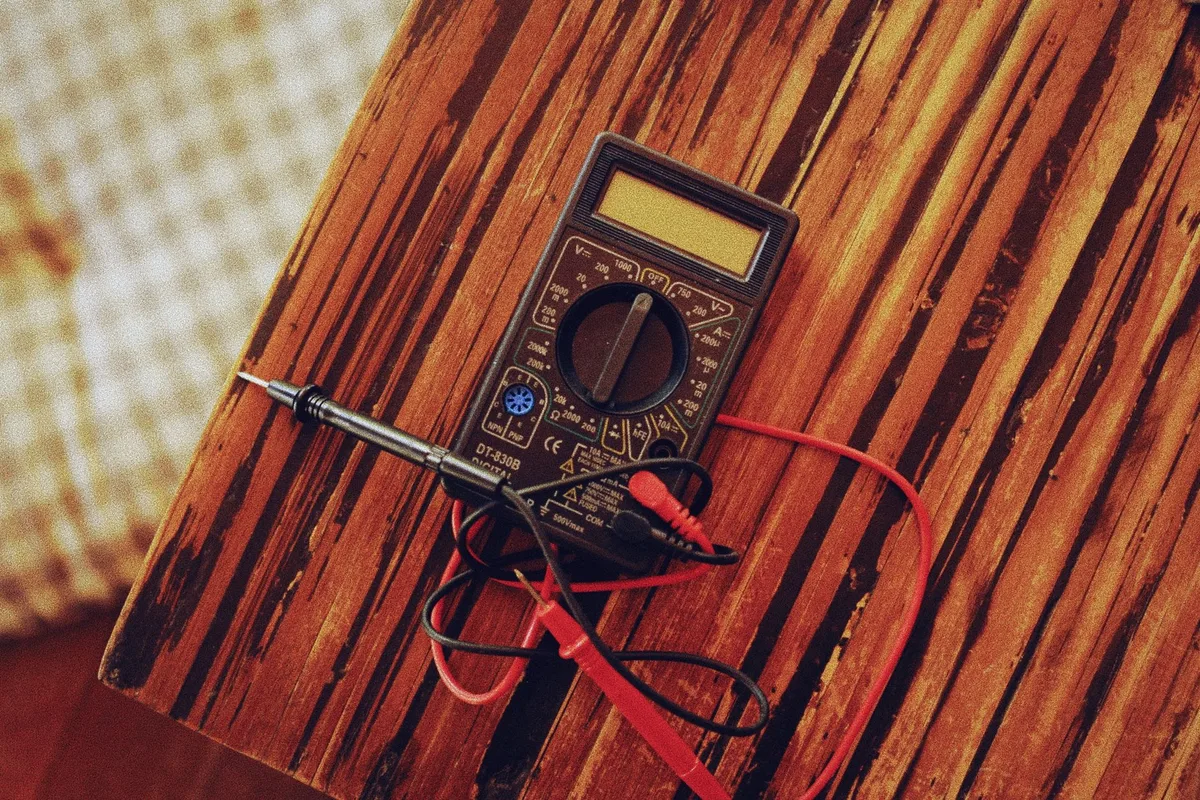
- COM: the black lead's home. It's the common (negative) reference for every measurement.
- VΩmA: the red lead for voltage, resistance, continuity, and small currents.
- 10A (or 20A): the red lead for high current only, usually unfused or fused separately.
Here's the mistake that fries meters: leaving the red lead in the 10A jack, then measuring voltage. That creates a near short across the source. Verified buyer feedback lists this as a top cause of blown fuses.

Similar Posts